
Calder Lounge
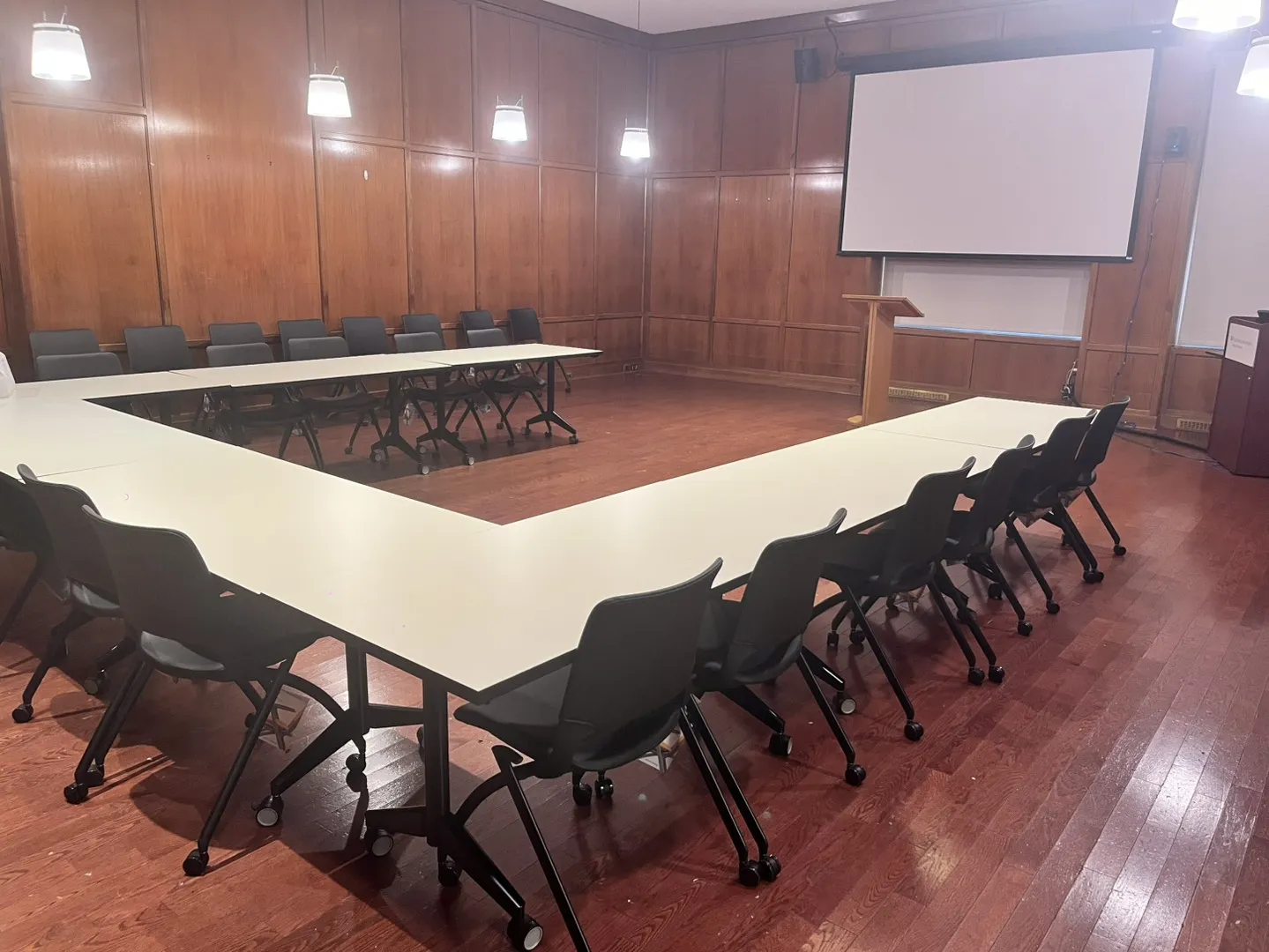
About the Space
Calder Lounge is a flexible meeting space located in Uris Hall that is well-suited for a variety of meetings, small events, and programmatic gatherings. The space can accommodate discussions, workshops, and administrative or faculty meetings, offering a convenient option for SPS programs and units seeking a cost-free venue on campus.
Cost
No cost is associated with using this space for SPS staff, faculty, and stakeholders. All SPS related events can only be booked through Instructional Support. Kindly note that UEM services can be contacted to support the space.
Calder Lounge requires the submission of a facilities ticket to arrange furniture and configure the space according to the event’s needs. In addition, any event involving food and/or beverage service will require post-event cleaning.
- Programs or departments will be responsible for providing a chart-string for the following:
- Catering (if ordered by Instructional Support)
- Room setup and breakdown via CUFO Facilities. Instructional Support will coordinate the submission of the Facilities ticket as part of the reservation process
Please note that the actual cost for any event requiring support depends on several factors, including the time of day, day of the week, total labor hours, and the cost of any materials required to complete the job; all services are also subject to a one-hour minimum labor charge.
To obtain a detailed and accurate cost estimate, clients are encouraged to contact CUFO Client Services at [email protected], where they can provide a formal quote based on the specific requirements of the event. Instructional Support will, by default, reach out for a cost estimate for priority event types (Curricular and Milestone Events, Full-day to Multi-day events)
For additional details, please review the following resources:
- Event Costs and Estimates: Breakdown of standard labor rates, material costs, and billing policies.
- Service Rates: Overview of how event-related costs are determined and key factors that impact pricing.
Cancellations & Last-Minute Changes
Cancellations need to be made 5-7 business days prior to the event on the Zendesk platform. Work orders submitted to Facilities are subject to their respective policies related to cancellation. Instructional Support will follow up on your behalf for any inquiries.
Recommended Uses
This space is best for small to mid-size meetings, academic events, small to mid-size workshops, and small social events.
Space Configuration
Below are the different layouts for the Calder Lounge. Please note if you need a larger space than what is presented below, the Instructional Support team will defer to place your event in another preferred SPS location. All furniture is located in storage areas next to the space.
- Room Dimensions: TBD
- Room Configurations:
- U-shape: 32
- Hollow square: 38
- Classroom: 30
- Clusters: 32
- Theater: 62
- Reception: 70
Technology
The technology available in Calder Lounge is a straightforward AV system that accommodates standard classroom formats. The system is best leveraged with sharing presentations, lesson plans, and showing videos. It is not recommended to use this room if your event or meeting has a large amount of remote participants.
- In-room PC system
- Projector with a screen for clear, high-quality visuals
- Podium with built-in microphone for remote audio
- Does not project in the space
- Two cameras
- Zoom camera for hybrid meeting functionality
- Front wall camera with remote-adjustable settings
- Crestron control system for managing AV functions
- Room speakers
Meeting OWL 4+ Support
Meeting Support & Setup
The Meeting OWL is an all-in-one conferencing solution designed to enhance hybrid collaboration through an immersive 360° meeting experience. The Instructional Support (IS) team provides Meeting OWL setup and operational support upon request exclusively within the Calder Lounge for hybrid meetings and events that require a more executive-style experience.
To ensure adequate time for assembly, testing, and troubleshooting, please review the following expectations:
- IS staff will set up the OWL equipment at least 30 minutes prior to the scheduled meeting start time.
- Instructional Support may require a dry run prior to the event date depending on the complexity of the request.
- The event’s Zoom meeting link must already be open and accessible on the in-room computer before the session begins. The default configuration utilizes the in-room computer for all OWL-supported meetings.
- We strongly recommend that the event requester or presenter also arrive at least 30 minutes prior to the event to prepare Zoom settings and any presentation or programmatic content.
- Requesters are responsible for Zoom room management and participant moderation.
- Presenters may bring an additional laptop or request a departmental loaner device for presentation support and auxiliary use during the session. A secondary device can help streamline presentation management, support chat monitoring, and minimize operational disruptions.
Please note that personal devices may experience technical limitations that cannot always be resolved during live events. A dry run is strongly encouraged to reduce this risk.
Intended Use
The Meeting OWL features a single 360° camera that captures participants within a 10-foot radius, eight integrated omnidirectional microphones with audio pickup up to 18 feet away, and built-in speakers that provide clear audio for remote participants. This setup helps create a more natural and inclusive hybrid meeting environment.
Please note that the OWL serves as a temporary hybrid meeting enhancement solution within the Calder Lounge and is best suited for:
- Small meetings
- Training sessions
- Hybrid boardroom-style events
For optimal audio and camera performance, the Meeting OWL is only supported in Boardroom or U-shape room configurations.
If you have questions regarding Meeting OWL 4+ support in Calder Lounge, please submit a Zendesk ticket through our support platform.
Direct Support
For any immediate technology issues, please contact the Instructional Support staff stationed in Lewisohn Hall. If an issue requires more extensive repair due to equipment malfunction, it should be reported to Instructional Support for follow-up. Please note that immediate, on-the-spot fixes may not be available in cases involving defective technology.