
Semester Scheduling and Enrollment Management
Resources for course scheduling & enrollment planning and Registrar’s Office systems
Semester Scheduling Overview
Semester Scheduling involves three distinct phases: Planning, Execution, and Management for each term. These phases will overlap depending where you are in the workcycle for each semester, and are completed on a rolling basis throughout the academic year.
Semester Scheduling is completed by Program Administrators and is managed by Academic Operations in collaboration with Faculty Affairs leadership and Associate Deans of Graduate Programs, Continuing Education & Academic Services & Innovation, as needed. The Registrar’s Office also communicates with programs about semester class scheduling milestones and works in collaboration with SPS stakeholders.
Curriculum Planning Statement (CPS) sheets are completed in advance of each instructional term, and include course scheduling information, faculty scheduling and hiring information, and are the primary location for programs to communicate faculty staffing, salary, course development projects, and non-academic instructional work to Academic Affairs teams.
Once semester schedules are published for student registration, the Registrar’s Office will assign class section classrooms, and Program Administrators will actively review and manage enrollment numbers, waitlists, and course appeals. Click on the phases of the Semester Scheduling process below for more information and resources for each step of this cycle.
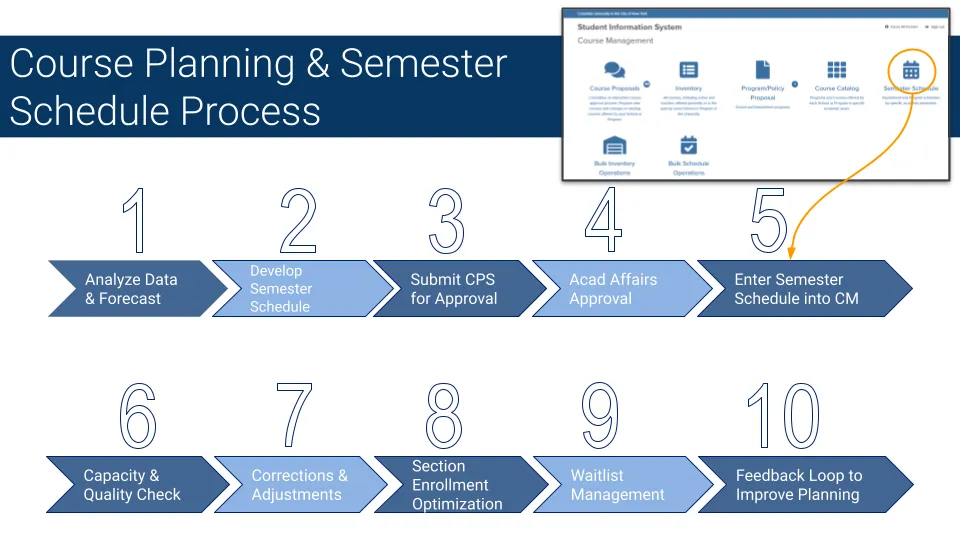
- Programs map course schedule, sections, and faculty for upcoming instructional term using the CPS
- Programs submit completed CPS sheets to Academic Affairs for Review
- Academic Affairs Reviews and Approves Sections
Resources:
- Curriculum Planning Statement (CPS)
- Synchronous Class Sessions calendars - Class session calendars map instructional terms so you and your faculty can plan class meetings around holidays, breaks, study days and finals, to ensure classes meet instructional time and meeting pattern requirements.
- Fall 2026 Synchronous Sessions (PDF Format)
- Fall 2026 A & B Terms Synchronous Sessions (PDF Format)
- Spring 2027 Synchronous Sessions (PDF format)
- Spring 2027 A & B Terms Synchronous Sessions (PDF Format)
- Summer 2027 Synchronous Sessions (PDF Format) - Coming Soon
- Stellic for course planning
- PowerBI Course Review Tool (CRT) - Login
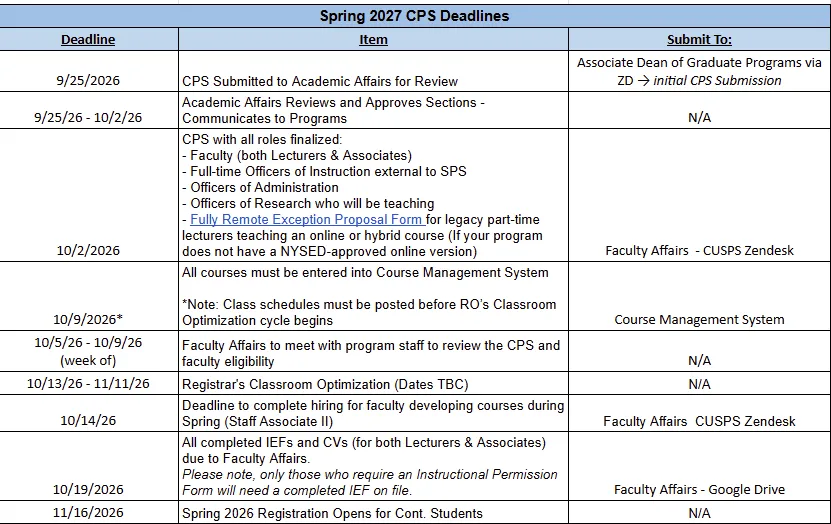
- All course schedules are published through Course Management System for student registration
- Registration opens for students, with Continuing Student registration opening earliest
- Faculty roles are finalized on the CPS, and program teams submit completed IEFs (if required) and CVs (for both Lecturers & Associates) to Faculty Affairs
- Registrar’s Office assigns classrooms for course sections (Class Optimization period)
Registrar’s Office Operational Cycles
Classroom Optimization
- During this period, meeting patterns (days/times) will be locked in Course Management while the Registrar’s Office makes classroom assignments. Before optimization begins, course schedules with requested meeting patterns must be entered in Course Management/Vergil and published.
- Enter all classroom assignments using your own departmental sequestered space, if applicable.
- Email [email protected] with preferred classroom assignment dates for departments with priority claim to Registrar-Controlled buildings, if applicable.
- Email [email protected] with requests for classrooms equipped with specific accessibility infrastructure or course-related technology.
- Classroom Optimization Timing - Exact dates TBD ahead of each cycle; As soon as dates are determined each term, they will be added to the Google Academic Calendar
- Fall: End of June - end of July
- Spring: Mid-October - Mid-November
- Summer: End of March-end of April
Post-Classroom Optimization Actions for Program Administrators
- Checking Seating Capacity
- Canceling or Consolidating Course Sections
Final Exam Room Preferences
- Usually ~2-3 weeks after add/drop, the Registrar will email programs to request exam room preferences
- Deadline to submit your requests is usually three weeks after email goes out
- Final Exam Assignments are assigned on a first-come, first-served basis. Please submit requests promptly, as late submissions may result in your preferred room being unavailable.
Resources:
Registrar’s Office & Registrar-Managed Systems
University Registrar’s Office Site
- Registrar’s Academic Calendar
Vergil
Course Management System
- Student Information System - Course Management main login
- Request Access to SIS and SSOL
- Registrar's Course Management System Administrative Resources - Choose from the upper drop-down menu for a fully up-to-date list of instructions for Course Management. Additional training for Course Management/SIS can be requested by emailing Associate Registrar John Tran ([email protected]).
- Course Proposals Module
- Course Inventory Module
- Semester Schedule Module
- Programs perform classroom capacity management check to ensure alignment between classroom size & course enrollment caps
- Programs perform a check of schedules to see if they need to cancel or consolidate course sections
- Programs manage student waitlist and appeals processes
Classroom Capacity Check:
When using the “Capacity Management” view in the CRT, please ensure that the Final Expected Enrollment accurately reflects the class’s intended enrollment after the Change of Program period. If the Final Expected Enrollment is set lower than the Enrollment Cap, the scheduling system may assign a classroom that is too small to accommodate the class. Given the limited availability of classroom space, an alternate room may not be available.
If no classroom is assigned: Reach out to Associate Registrar John Tran ([email protected]). In order to determine a suitable classroom assignment, you may be asked to do one of the following:
- Shift the time the course is offered. 6:10 PM is the most popular class period at the university. We recommend shifting to an earlier or later start time (i.e. 4:10 PM or 8:10 PM).
- Shift the day the course is offered. Monday and Thursday are generally the most popular days for courses. We recommend utilizing Tuesdays, Wednesdays, or Fridays as an alternative.
Cancelling or Consolidating Course Sections:
Courses with low enrollment are defined as courses with enrollment that is less than 5 or enrollment less than an optimal number to execute the class as pedagogically designed (i.e. complete group projects). Low enrollment is determined at the point at which the majority of students who are eligible to register for the class have registered for courses in a given semester.
Courses must run in a given semester if they meet any of the following criteria:
- Course is part of a required course sequence
- Course is necessary for a registered student to complete the degree requirements in the given semester
- Course in an independent study or capstone workshop
If you have courses that do not meet the criteria mentioned above, we kindly request that you either combine multiple sections of the course or cancel it if permitted.
To cancel a course, please follow steps laid out in the Course Cancellation Policy. Be sure to submit a ticket to the CUSPS Helpdesk with the subject "Course Cancellation" from the “Type of Request" field menu to notify the Registrar of the cancellation.
Resources: